Remaining calories is a view of your food diary
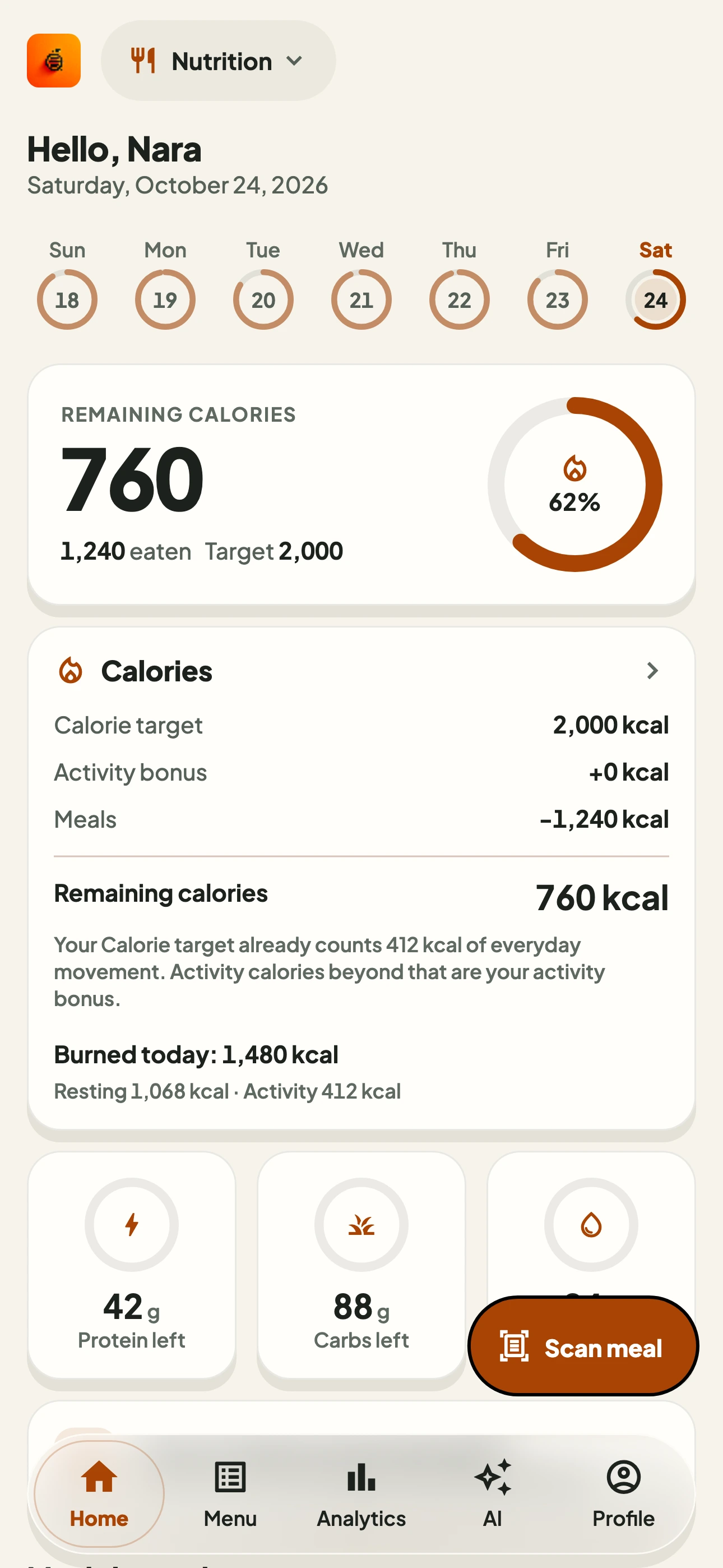
In Nourri Nutrition, remaining calories means your calorie target plus the activity bonus, minus the estimated calories in meals saved for the selected day. It helps you read your daily log. It is not a direct measurement of what your body needs or an instruction to eat or stop eating.
Read the calculation as remaining calories = calorie target + activity bonus − meal calories. Check the selected date first, then read each line in the Calories card. Today's balance and yesterday's food entries do not describe the same day.
Read the three inputs separately
Calorie target is the reference used by the app for that day. It differs from calories already eaten and estimated calories burned. The values in the app preview illustrate the interface; they are not targets for you to copy.
Activity bonus is the addition the app calculates using available activity information. The target already includes an allowance for everyday movement. The bonus is therefore different from total calories burned. Do not add the total burned figure again to the remaining amount shown by the app.
Meals reflects estimates from the entries you have saved for that date. An analysed photo or a suggested lunch is not automatically a saved meal. See Daily menu vs food diary for the difference between a suggestion and a diary entry.
Why does the balance change after a meal?
Imagine logging a café sandwich during a workday in London, then noticing that the saved portion was larger than the amount you ate. Correcting the portion can change both the meal estimate and the daily balance. That is a change to the record, not a sudden change in your body.
Check the food name, portion, date and any duplicate entries. A coffee with milk, dressing or an extra side may also belong in the record if you had it. The aim is to make the diary describe your meal more closely, rather than to make the numbers look tidy.
If you use packaging information for a supermarket lunch in France or the UK, make sure the amount you record matches the amount eaten. Our guide to per 100 g versus per portion explains that separate label-reading step. Calories and macros remain estimates.
A zero bonus does not mean you did not move
The bonus may stay at zero when activity has not exceeded the everyday-movement allowance already included in the target. Missing information is also different from a measured absence of activity. Read the app's message if data is loading or required profile information is incomplete.
The burned-calories section has a different job: it describes estimated resting and activity components. That total does not need to match the activity bonus. Two values displayed in kcal can still represent different things.
A quick check when a number looks unexpected
Before responding to an unexpected balance, work through the record:
- Confirm that you have selected the right date.
- Review saved meals, portions and duplicate entries.
- Read the target and bonus as separate inputs.
- Check any data-status message and review again after loading finishes.
A negative remaining value means the estimated saved meals exceed the target plus bonus in the app's calculation. It is not a judgement about a food or a measure of your health. Treat the overview as a logging tool, not personalised nutrition advice.
Open Nourri Nutrition and try reviewing one day in your diary. Nourri is available on the App Store and Google Play.